
How To Enable Automatic Software Updates In IOS 12
iOS 12 has the ability to perform automatic system updates in 2013. It introduced an automatic application update with iOS 7. After that Apple decided, users will no need to worry about updating their iPhone again with automatic system updates in iOS 12. The Apple-provided “partial” automatic system updates to alert the users. Than an iOS update was available to ask permission which helps in automatic installation. With the help of iOS 12, you will also receive a warning right before an update without the user interventions. Here, the only requirement is that, your mobile or iPhone should be connected both the charger and Wi-Fi.
Apple plans to determine the time that the user’s iPhone is most likely to be ideal. Then, it will check for any iOS updates to apply them automatically and ensure that the user is always up to date with the latest features and security fixes. Generally, almost all the users prefer to manage their own iOS device updates. When Apple comes to software updates, it doesn’t have a perfect record. There are some situations arise in which users need to be running a specific version of iOS. This is used for application testing or compatibility.
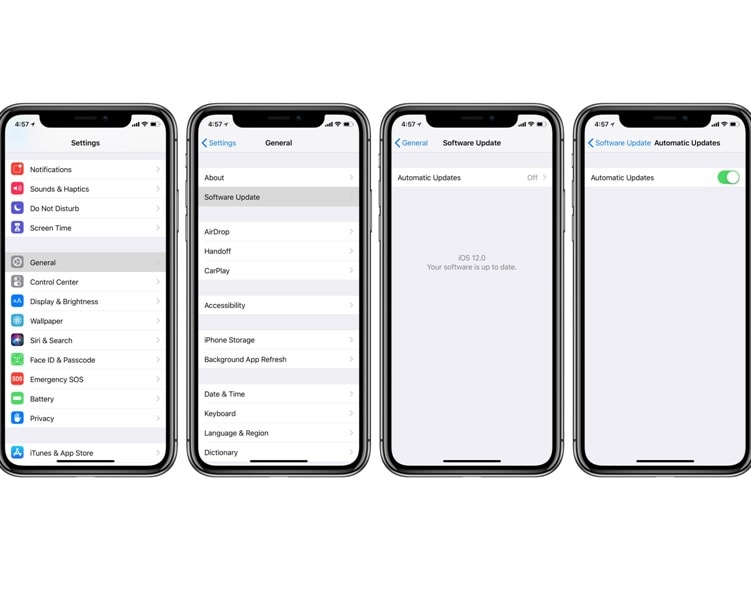
Here’s how to enable automatic iOS system software update are described in the following steps;
-
First of all, you have to open the “Settings” app on your iPhone or iPad.
-
Click on General.
-
Tap Software Update.
-
Then you will click on Automatic Updates.
-
Tap switch next to Automatic Updates to flip to the green “ON position”.
Whenever you enabled the system software updates, you must disable it. The steps to disable the system software update are given below;
-
First, Open the “Settings” app.
-
Then go to “General”.
-
And then go to “Software Update” similar to the previous one.
-
Choose “Automatic Updates” to tap the switch to the “OFF position”.
How to Get Automatic App Updates
The automatic update features in Settings are applied to iOS updates. If you want to keep your entire installed app up to date, then you can do that from settings also.
-
First, go to the settings and tap on the iTunes & App Store.
-
Go to the automatic download section, manage which downloads you would like to receive automatically.
In the case of Books, Audio books, Music, and Apps, you are controlling whether your current iOS device downloads any purchases made on other iPhone or ipad that share your Apple ID.
Read More Article: Change Language In Google Chrome (2019)
About author

Redmi Note 7 Pro Camera Settings for Best Photos
Unlock your phone's full potential. Master Pro mode, 48MP shooting, and GCam setup with the ultimate Redmi Note 7 Pro camera settings for best photos.
Craiyon AI Explained: Features, Tools & Review 2026

Discover what Craiyon AI is and how it works. Explore its image generator, drawing tool, and background remover in this easy, honest 2026 review.
Huawei MateBook X Pro Review: The Best Ultraportable?

Read our Huawei MateBook X Pro review covering its design, OLED display, performance, battery life, price, pros, and cons to see if it's worth buying.
Samsung TV Picture Settings: Select Your Best Mode

Learn how to adjust Samsung TV picture settings the right way. Compare all picture modes and discover the Smart Calibration app for perfect visuals.
Is Public Wi-Fi Actually Safe? The IObit Malware Fighter Network Protection Routine I Never Skip

Learn how to stay safe on public Wi-Fi with essential security tips, including firewall settings, HTTPS, VPNs, malware scans, and IObit Malware Fighter.
Learn How to Set Shutter Speed on Canon Cameras Easily

Master how to set shutter speed on Canon. Learn how to freeze fast motion, prevent blurry photos, and choose the best settings for stunning images.