
Craiyon AI Explained: Features, Tools & Review 2026
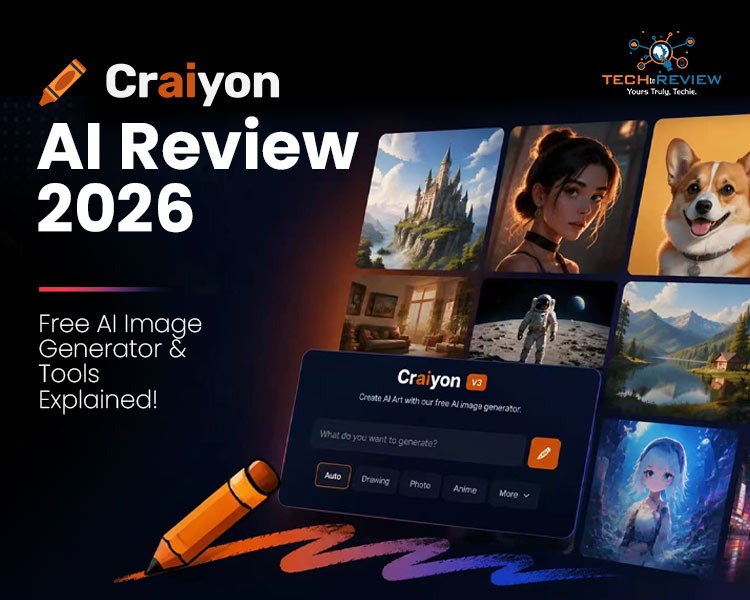
Ever had a crazy creative idea in your mind? But lack drawing skills? If yes, then you are not alone; we all have been there, and we all have done that. But as technology improves and artificial intelligence becomes part of our daily lives, now we have multiple tools to bring your crazy ideas to life. One of these tools is Craiyon AI, which helps you bring your idea to your screen. And you know what the craziest part is? It’s FREE.
In this write-up, we will walk you through what Craiyon AI actually is, what the features include, and how to use it. So in future, if an idea comes to your mind, you do not have to let it go.
What Exactly is Craiyon AI?
If we put it simply, craiyon AI is a tool that brings your imagination to life, turning your words into pictures. For example, you type something like, “a whale having a drink on the beach”- and boom, Craiyon AI will actually draw your imaginary image, without drawing skills, sketching or a fancy prompt needed.
Craiyon AI was earlier known as DALL-E mini. It got famous because the tool was letting people mess around with AI art for free. Since then, it has rolled out many new features and is now known as Craiyon AI.
Here is the thing: Craiyon AI runs on a model that's been trained on tons of images and their descriptions. So, when you type a word, it analyses the word and figures out what you mean to say and draws a picture around it. You usually get nine different versions from a single prompt, so you've got options to pick from.
But if you want to generate more images and videos without a watermark, Craiyon AI offers subscription plans starting at $10 a month and going up to $70.
What Can Craiyon AI Do?
So let’s talk about its features, as this is the most interesting part of the tool.
- The first and most interesting part is that you do not need to sign up. You can just open the site and start generating the images with your favourite prompt.
- The second most interesting part is that you don't have to wait long. Your image is created in just 15-30 seconds.
- You can choose from different styles, like Photo, Anime, Illustration, Vector, Artistic, and Raw, depending on your mood.
- You do not have to download any app, so there is no stress about your phone space. If you are an Android user and want to download the Craiyon AI app, you can do that too.
- The most interesting part is that you have 9 options to generate an image. If you are not satisfied with the results, you can generate the image 9 times.
- Craiyon AI even have an inbuilt editing feature, which lets you enhance, edit, upscale, retouch small stuff and even lets you do simple animation.
Honestly, that's what makes Craiyon AI stand out. It's not just one tool, it's a bunch of small tools packed into one site.
Step-by-Step Guide to Craiyon AI Image Generator:
The Craiyon AI image generator is basically the heart of the whole platform. It's the part that actually creates the pictures. Here's how it works, step by step:
Head over to the Craiyon AI website.

1.Type out what you're picturing in your head (this is your prompt).

2.Hit generate and give it a few seconds.

3.You'll get nine images based on your prompt.

4.Pick the one you like or you want to edit; you will get an option for retouching, where you can enhance your image

5.Put your prompt

6.And your image is ready; you can download it now.
The Craiyon AI image generator is great if you are just a beginner or learning how to put prompts to generate images. The quality isn’t perfect like the paid tools, but it all depends on your prompts. Add something like "detailed face, sharp focus" to your prompt. It genuinely helps more than you'd expect.
You might also like: Top 8 Smart Home Devices That Actually Upgrade Your Home
Craiyon AI Image Background Remover
Now here's a feature we genuinely didn't expect to like as much as we do: the Craiyon AI image background remover. Instead of opening up Photoshop or some other editing app, you can clean up your image right on the same site.
It's pretty simple.
- You pick an image you made (or upload your own).
- Tap the background remover, and it traces around your subject and drops everything behind it.
- A few seconds later, you've got a clean, transparent cutout ready to go.
This alone saves a ton of time.
People use the Craiyon AI image background remover for product photos, Instagram posts, and quick design work. You don't need any editing background at all. It's a small feature on paper, but it makes a real difference when you're in a hurry.
So, Should You Try Craiyon AI?
Here's my honest take. If you're a beginner, a student, or just someone who wants to mess around with AI art without spending a dime, Craiyon AI is worth your time. It keeps things simple, and honestly, that's rare these days. The image generator, the drawing generator, and the background remover all work together nicely, so you're not bouncing between five different apps.
FAQ’s:
1.Does Craiyon AI require any technical skills to use?
No, Craiyon AI is beginner-friendly. Just type your idea in plain words, and the tool handles everything automatically.
2.Can I use Craiyon AI images for commercial purposes?
Paid plans allow commercial use with private rights, while free images may have licensing restrictions depending on usage.
3.How is Craiyon AI different from Midjourney or DALL-E?
Craiyon AI focuses on free, easy access, while Midjourney and DALL-E offer sharper, more detailed image quality.
About author

Portable Bluetooth Speaker: Best Picks for Your Travel Bag

Looking for a portable Bluetooth speaker for travel? Check out 5 easy-to-carry options with different sound, battery, and durability features.
Budget Gaming PC: The Smart Gamer’s Guide to Saving Money

Looking for a budget gaming PC? Learn how to choose the right GPU, CPU, RAM, storage, PSU, and cooling without overspending.
Why Is My Cell Phone Getting Hot? Learn the Quick Fixes

Wondering why is my cell phone getting hot? Discover the hidden triggers behind your device overheating and learn quick, safe tricks to cool it down fast.
How to Make Your Laptop Run Faster: Easy Ways to Speed Up

Is your laptop slow or freezing? Learn easy ways of How to make your laptop run faster, from clearing files and updating software to upgrading RAM and SSD.
Why Responsible IT Asset Disposition Matters in the Age of Constant Upgrades

Discover why responsible IT asset disposition matters in an upgrade-driven world, helping businesses protect data, reduce waste, and recover asset value.
3:2 vs 16:9: Which Aspect Ratio Should You Choose

Wondering about 3:2 vs 16:9 aspect ratios? Learn the key differences, best use cases, and limitations to pick the right one for your shots.