
How To Get Hold Of Someone’s Web Browsing History

When you want to know about a person’s interest, knowing about their internet activity could tell you a lot. Monitoring someone’s online activities could get you an insight into someone’s interest, the kind of content they are interested in, the communities they have joined, and the people they interact with online.
The need to check web browser history
Well, different people will have different motives for accessing someone’s web browsing history. An employer would want to ensure that his staff is not wasting the company resources surfing the web, chatting, shopping, or getting involved in a scam. At the same time, someone could be concerned about their partner’s addiction to pornography.
But it’s the parents that have it the toughest while raising children in a digital age. Every child today has a tablet or phone. They became “netizens” from an early age, and parents have to ensure that they not only educate their children but control their internet use as well. Just like the real world, the internet comes with its share of dangers and threats, though not too obvious, but are there.
This calls for regular tracking of your child’s web browsing history so that you can get familiar with the different websites they visit and intervene the moment you think something your child is doing could get him into trouble. Since children today are born into the digital age, they prefer to spend most of their time on the web.
Tracking Your Child’s Web Browsing History - Why is it important?
Why should you check your child’s web browsing history?
• To prevent exposure to adult or pornographic content on the internet via smartphones because even an innocent search could bring up some disturbing search results.
• There is the risk of watching hateful or violent content that could damage your child's psychology.
• You get a peek into your child’s internet and know what runs in their minds and what they are interested in.
• Also, if your child has suddenly become withdrawn or having eating disorders, it might be linked to social media. Social media has led to a train of issues in teenagers ranging from cyberbullying, body-shaming, harassment, depression, self-esteem problems, etc. Having access to web browsing history along with other digital footprints allows parents to be in the know of what is going on in their child’s lives.
.png)
It is easy to delete the web browsing history from their phones when they want, which makes it all the more necessary to invest in a tracking app that you let you access their history regularly and even see the deleted searches.
Xnspy – The Best Approach to Track Web Browsing History
Social media channels are popular among teens and adults. But the rapid pace at which the technology is advancing has doubled the risks of the digital world. Constant communication via the internet made children almost oblivious to rules of exchanges with others. One could be anonymous and do whatever they want without thinking twice about saying or doing it in real life.
With Xnspy child tracking app, you can access their web browsing history with the date and time as well as the frequency of visits. With everyone having a personal phone, kids can access whatever and even know about matters that are not appropriate for them at this age. Xnspy helps you in preventing that as you can see their browsing history and bookmarked sites. The app allows you to manually check all the digital activities including, emails, social media conversations, and the multimedia your child sends or receives via different messaging apps. Not only that, you can check your teenager’s text messages, call logs, locations, and record their surroundings as well. You can also enjoy some of the best remote features such as locking the device and shutting it down that can come in handy if your child is addicted to social media that is messing up with his sleep as well as study. Also, you can clean it off data and send a command to record the surroundings.
Here is how you can access your child’s web browsing history with the help of this app:
Getting Started
Subscribe, Download, and Install
First of all, you need to install Xnspy on your child’s phone. The best thing would be to make it clear, when you get your child their first smartphone, that they are going to be monitored. This impacts their digital behavior and instills a sense of responsibility. It is important to educate them about the right way to go about the internet and safe use of their information.
If your child has an Android phone, you will have to physically install the app on their phone. In the case of an iPhone, you should have the cloud credentials. There is no need for the physical installation of the app. Xnspy syncs with a person’s iCloud to do the monitoring.
When you subscribed to Xnspy, you’ll receive an email that contains the activation code, a download link, and the installation details. See that in case of an iPhone, you configure the iCloud backup, and after entering the Apple credentials of the said phone, your app can begin tracking.
Enabling Browser Tracking
Whether it is an Android phone or an iPhone, the steps to enable the web browser history are identical. Here is a step-by-step tutorial:
• First of all, use your Xnspy credentials to log in to Xnspy’s web account using the official website so you can access the dashboard that will present the different phone activities on the screen.
.png)
• You would come across a menu on the left of the screen. Select Phone Logs that would further open a drop-down menu.
.png)
• From there, you would find many options on the screen. Choose the option of Internet History from the menu. This would lead to a list of all the web searches that took place on your child’s phone.
• You would see three sections under the heading of Internet History Logs: internet history, bookmarks, and analysis.Tapping on each of them would let you see the relevant details. You can see the history of all the internet searches, see the bookmarked sites, and the analysis would bring you the Top-10 most visited websites.
.png)
.png)
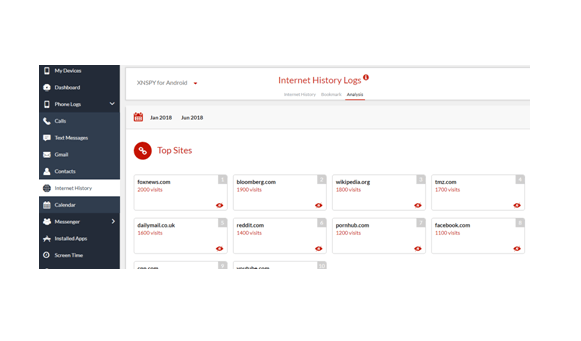
You can use Xnspy to track real-time browsing data. But real-time tracking works in the case of Android only. You will have to wait till the next iCloud backup to see the web browsing data of an iPhone.
Also, Xnspy lets you track the deleted browsing activities. Even though u impose restrictions, somehow, your teen would find some way to bypass it. But, with Xnspy, you can rest assured that the app would maintain data backup constantly. This way, you don’t miss a thing. If the app has recorded the internet activity and made its backup, you can view it remotely even its deleted by the user. Xnspy is one of the few apps to support offline tracking, which means that the app is going to work in the presence of an internet connection. Xnspy continues to record the data, and as soon as the device gets connected to the internet, it uploads the information to the online dashboard.
Xnspy has made access to web browsing history a breeze, no matter it is an Android phone or an iPhone. With a few clicks, you can remotely access the web browsing history and be in the know of what your child looks for on the internet.
Samsung TV Not Connecting to WiFi? Get the Easy Fixes Here

Samsung TV not connecting to WiFi? Learn why it happens, try easy step-by-step fixes, and know what to do if nothing works. Fix & get back to streaming fast.
Rangefinder Digital Cameras: Benefits and Limitations

Discover what a rangefinder in digital camera is, how its focusing works, its advantages and limitations, and why photographers love it for street photography.
Why Phone Storage Gets Full Even If You Barely Install Anything

Discover why your phone storage fills up without installing apps. Learn how cached files, photos, hidden downloads, and system data consume space.
Top 5 Entry-Level DSLR Camera Picks to Buy in 2026

Looking for a great beginner camera? Discover the top 5 entry-level DSLR cameras to buy in 2026, featuring the best budget, travel, and video choices.
Best LED Black Friday TV Deals: Your TV Shopping Guide

Discover the best LED Black Friday TV deals for 2026: when sales start, how much you can save on LED, QLED, and OLED TVs, plus tips to spot fake discounts.
Portable Bluetooth Speaker: Best Picks for Your Travel Bag

Looking for a portable Bluetooth speaker for travel? Check out 5 easy-to-carry options with different sound, battery, and durability features.