
Xiaomi Mi Box 4 vs 4C vs 4SE: How To Set Up And Use Mi Box
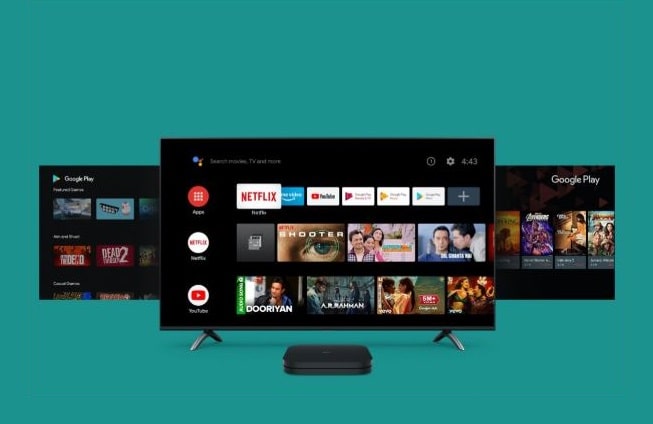
The Xiaomi launched Mi Box 4, 4C and 4SE to step in the media & entertainment industry by introducing Android-TV powered set-top box namely Xiaomi Mi Box 4 — 4K Online Media Streaming Device. It is available at an inexpensive value to double your entertainment by offering FHD Content playback. There are so many interesting things about the all-new Mi Box as it seems quite popular among the tech savvies. After all, the box offers 4K streaming support, HDR, Android TV 6.0, a Cortex A-53 Quad-core CPU enclosed at 2.0 GHz and features 2GB RAM empowering 8GB built-in flash storage to speed your recreation. All these outstanding features are available at a very low price of $55.8. So, if you’re planning to invest in an Android-TV Set-top box, then here is how to pick the best one among Xiaomi Mi Box 4, 4C, and 4SE.
Xiaomi Mi Box 4, 4C, 4SE: Specifications & Features and Differences
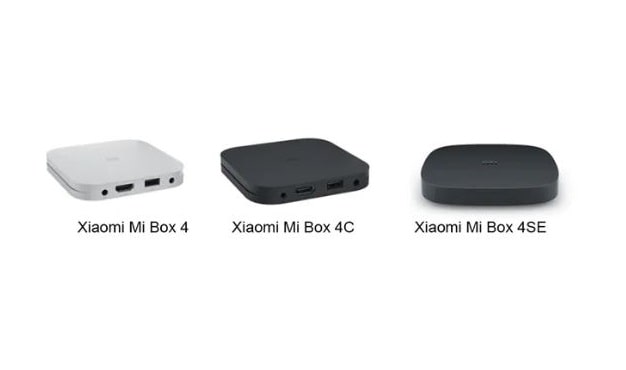
The company didn’t make much effort on the appearances as there is no difference between three models except colors. Yes, Xiaomi Box 4SE is a bit higher in appearances because it’s in circular & angular shape.
Differences Through Specifications & Features
|
Specifications |
Xiaomi Mi Box 4 |
Xiaomi Mi Box 4C |
Xiaomi Mi Box 4SE |
|
Max Resolution |
4K (3840 X 2160) |
4K (3840 X 2160) |
4K (1920 X 1080) |
|
CPU |
Amlogic Cortex-A53 Quad-Core 64-bit 1.5GHZ |
Amlogic Cortex-A53 |
Cortex-A7 Quad-Core |
|
GPU |
Mali-450 750MHz |
Mali-450 750MHz |
Mali-400 |
|
RAM |
2G |
1G |
1G |
|
ROM |
8G |
8G |
4G |
|
WiFi |
802.11b/g/n, 2.4GHz |
802.11b/g/n, 2.4GHz |
802.11 b/g/n, 2.4GHz |
|
Video Decode |
H.265: 4K2K@60FPSH.264: |
H.265: 4K2K@60FPSH. |
H.265: 8Bit,1920*1080P@60FPS |
|
Video Form |
RM, RMVB, FLV, MOV, AVI, MKV, TS, |
RM, RMVB, FLV, MOV, AVI, MKV, TS, M2TS, MP4, 3GP, MPEG supports 3D output |
FLV, MOV, VOB, AVI, MKV, TS, M2TS, MP4, 3GP, MPEG supports 3D output |
|
Audio Decode |
DOLBY AUDIO, DTS 2.0+Digital Out |
DTS 2.0+Digital Out |
N/A |
|
Audio Form |
MP3, APE, Flac, AAC, Ogg |
MP3, APE, Flac, AAC, Ogg |
MP3,APE,Flac,AAC,ADPCM,AMR-NB,OGG |
|
USB Port |
HDMI, USB, AV, charging port |
HDMI, USB, AV, charging port |
HDMI, USB, AV, charging port |
|
Control Type |
Bluetooth voice remote c |
Infrared remote |
Infrared remote |
As per the above specifications and comparison, it’s clear that all of these models are different from each other either from video quality or audio, you will find differences as per the amount you’ve paid. So, the cost of Xiaomi Mi Box 4, 4C, and 4SE is $50.88, $45.76, and $47,45 respectively.
Along with these features, Xiaomi Mi Box 4 has more features, including Bluetooth voice controls so that you can take calls without interruption and stream to your favorite TV show from your couch. Xiaomi Mi Box 4 comes up with 2GB RAM, 8GB internal flash storage and supports 4K HDR video streaming along with Dolby’s high sound quality - Dolby Audio + DTS-HD audio decoder output.
With such outstanding features, Xiaomi has launched it with a built-in Chromecast and remote controls. It comes up with Chromecast and Google Assistant control along with remote and Bluetooth controls.
How to Set Up and Use a Xiaomi Mi Box 4 (Android-TV Set-top Box)
Here’s step-by-step guide to set up your Xiaomi Mi Box:
-
Connect Your Mi Box and TV via HDMI Cable and Power On.
-
You Will See Marshmallow Screen, Choose Your Preferred Language Here.
-
The System Will Ask You To Complete This Process Using Mobile or Handy Tablet.
-
Connect Your Mi Box to a Wi-Fi Network.
-
Once It Connects to Secure Network, You will be Asked to Connect Your Google Account.
-
Sign In to Your Google Account.
-
You Will Be Redirected to the Home Page.
-
You’re Ready to Stream Your Favorite Movie or TV Show.
With such amazing features it offers HD, FHD and UHD video streaming with high-end features and easy controls. So, if you’re getting bored and don’t want to invest in an Amazon Stick or smart TV, you can make your TV smart using this Android-TV Set-top box. If this setup-guide helps you then subscribe to our daily newsletter the latest tech reviews and go-to-go guides.
Read More Article: Xiaomi Mi 10 5G
About author

From Cards to Screens: The Evolution of Digital Games

Card games and board games used to come with a fair bit of setup. You needed the cards, pieces or board in front of you, and in many cases someone else had to be there too.
RTX 5060 vs RTX 4060: Is the Newer GPU Worth Your Money?
RTX 5060 vs RTX 4060: Compare gaming performance, FPS, GDDR7 vs GDDR6, DLSS features, power consumption, and prices to choose the right GPU in 2026.
How I Reclaimed Crucial SSD Space Without Deleting Essential Data Using Advanced SystemCare 20

I did not want to drag folders to the Recycle Bin and hope for the best. I wanted to free up room without losing documents, photos or settings. That is how I ended up testing Advanced SystemCare 20, a free Windows cleaner from IObit.
Samsung TV Not Connecting to WiFi? Get the Easy Fixes Here

Samsung TV not connecting to WiFi? Learn why it happens, try easy step-by-step fixes, and know what to do if nothing works. Fix & get back to streaming fast.
Rangefinder Digital Cameras: Benefits and Limitations

Discover what a rangefinder in digital camera is, how its focusing works, its advantages and limitations, and why photographers love it for street photography.
Why Phone Storage Gets Full Even If You Barely Install Anything

Discover why your phone storage fills up without installing apps. Learn how cached files, photos, hidden downloads, and system data consume space.