
How To Download Facebook Videos On Android & iOS
Facebook is one of the largest social networking platforms in the world, with more than 2 billion daily active users. The reason behind Facebook's popularity is its unique and user-friendly features, which are upgraded with every update considering user demands. One of the most entertaining features of Facebook is short videos, which are often approached by all age groups. Depending on the individual's interest, Facebook broadcasts every type of video. But unlike YouTube, Facebook doesn't provide offline video-watching options. While you can download your video uploads, it doesn't offer a feature to download videos uploaded by others.
Although it is tricky, we bring a sorted guide for those who want to watch Facebook videos offline. Go through this blog on how to download Facebook videos on Android and iPhone and get your favourite video seamlessly to enjoy it offline.
Download Facebook Videos On Andriod & iOS Devices
Since Facebook does not have an offline viewing mode, people who want to watch their favourite videos offline must use their browser to download the content. Here is a step-by-step guide on how to download videos from Facebook.
-
Go to the Facebook video that you want to download using the Facebook app or website.
-
If you use the app, hit the Share button and copy the link. Head to the URL bar and then manually copy the link from the website if you are using Facebook website.
-
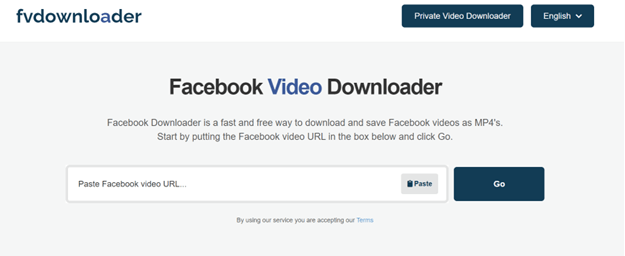
Open your preferred browser, such as Opera or Google Chrome, and go to fvdownloader.net.
-
Paste the copied link; once this is done, you will know how to Download Facebook Videos on Android.
-
You can see a 'GO' button; click it.
-
Once this is done, the video will be downloaded to your downloads folder.
This is how to download videos from Facebook on your Android devices, such as mobile and tablets. If you have iOS devices, follow the steps below.
You can use this third-party website to download the videos on Android and iOS, both. If it doesn't work, there are several other methods that you can follow when searching for how to download Facebook videos on Android.
Use Facebook’s HTML Code To Download Facebook Videos Effectively
Although Facebook Video Downloader is the easiest way to download videos, some people do not want to use third-party apps because of safety concerns. Considering this, we bring another method to understand better how to download videos from Facebook without using any third-party app.
-
Open your computer web browser.
-
Navigate to the Facebook video you want to download.
-
Click on the double-headed arrow at the button-right of the video.
-
Now, copy the URL from the address bar.
-
Open a new Incognito Window in Chrome, paste the copied URL, and hit ENTER.
-
Right-click on the computer screen and select View Page Source.
-
You can see Line warp in the top left corner; check the box next to it.
-
Press Control + F on Windows or ⌘ Command+F for Mac. This opens the find bar at the top, allowing you to search for a certain text string.
-
Next, type hd_src: you should see two hd_src. Copy the long URL between both.
-
Press Control + T for Windows and ⌘ Command+C for Mac to open a new browser tab.
-
Paste the URL into the new browser tab and press ENTER.
-
Click on the Humburg button to download the video.
-
The video will be saved on your computer in MP4 format, which you can play on almost any video player.
With this, you probably get a proper idea of how to download Facebook Videos on Android, iOS, and computers. These methods are not only easy but also effective. You can seamlessly download the videos from your device like mobile, tablet, or computer and enjoy them offline.
Facebook is an interesting social networking site that boasts several features. With the increasing number of users and their demands, Facebook brings unique features. Moreover, it does put users' personal data at risk. It provides a wide range of privacy and security features to help users protect their personal information. One of the key features is making your Facebook profile private. With options to limit the profile access to strangers and those not on your friend list, users can tailor their privacy preference to their comfort level.
Hopefully, you find the write-up helpful. If you are looking for other guides, do not hesitate to mention your requirements in the comment section.
About author

How I Reclaimed Crucial SSD Space Without Deleting Essential Data Using Advanced SystemCare 20

I did not want to drag folders to the Recycle Bin and hope for the best. I wanted to free up room without losing documents, photos or settings. That is how I ended up testing Advanced SystemCare 20, a free Windows cleaner from IObit.
Samsung TV Not Connecting to WiFi? Get the Easy Fixes Here

Samsung TV not connecting to WiFi? Learn why it happens, try easy step-by-step fixes, and know what to do if nothing works. Fix & get back to streaming fast.
Rangefinder Digital Cameras: Benefits and Limitations

Discover what a rangefinder in digital camera is, how its focusing works, its advantages and limitations, and why photographers love it for street photography.
Why Phone Storage Gets Full Even If You Barely Install Anything

Discover why your phone storage fills up without installing apps. Learn how cached files, photos, hidden downloads, and system data consume space.
Top 5 Entry-Level DSLR Camera Picks to Buy in 2026

Looking for a great beginner camera? Discover the top 5 entry-level DSLR cameras to buy in 2026, featuring the best budget, travel, and video choices.
Best LED Black Friday TV Deals: Your TV Shopping Guide

Discover the best LED Black Friday TV deals for 2026: when sales start, how much you can save on LED, QLED, and OLED TVs, plus tips to spot fake discounts.