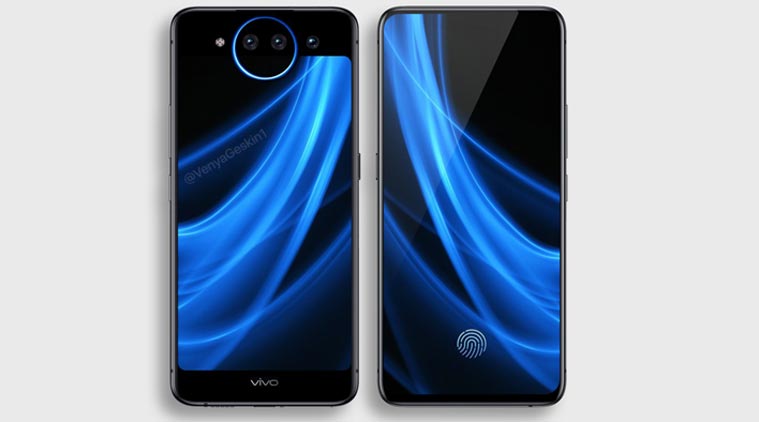
VIVO NEX Dual Display Edition Specifications And Full User Review

VIVO NEX Dual Display


I personally am a fan who instead of following the footsteps of other phone manufacturers tries implanting new innovations of their own. Last year we saw the Vivo NEX gathering quite an attention from the crowd. 
The trend of the notch started way before Apple started implementing it in their iPhone. Since iPhone is considered as a luxury phone the trend has stuck on for a while and we can see many manufacturers still today trying to use the notch as their main selling point.  On the other hand, we saw Vivo NEX trying to pull off a full bezel-less display without bothering about a notch. However, with the extreme bezels, the front camera had to be sacrificed but, the last year version of the Vivo NEX has a motorized version of the front camera which would pop up only when needed.
 
     Now back in 2019, we have the Vivo Nex Dual display edition, again not bothering about the notch. But, this time on we see no slider of some sort instead, we get a beautiful dual display with only the rear camera.
 

Camera Performance of the Vivo Nex Dual Display Edition
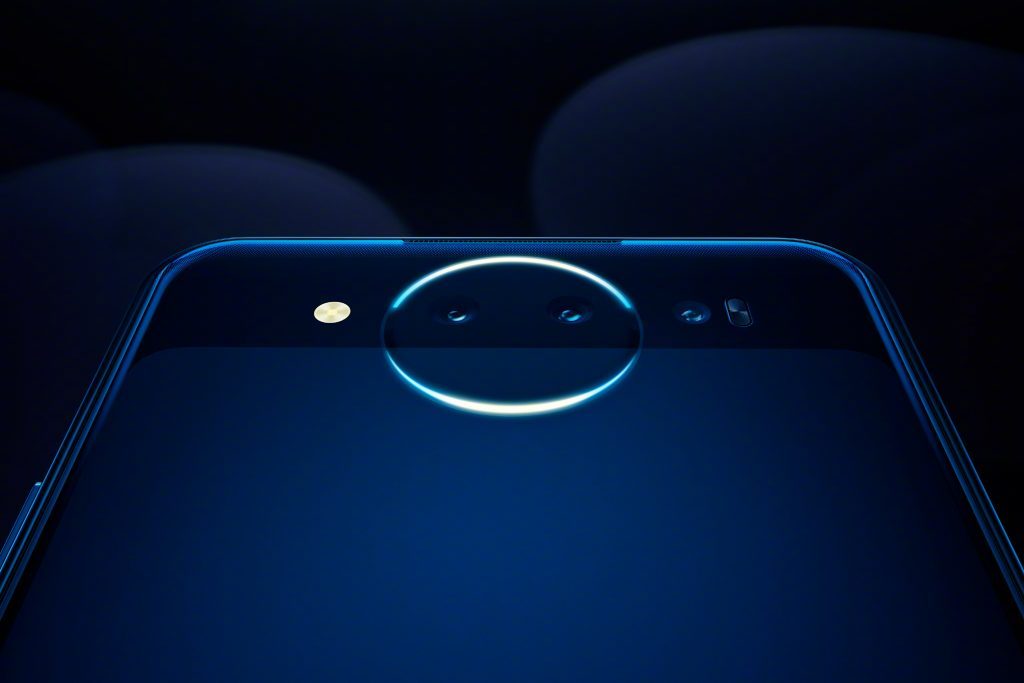

            The Vivo Nex Dual display edition features only cameras on the Rear, you won’t be seeing a front camera on this Smartphone. The reason behind this is the dual display setup. As we never get to see Smartphones with a better front camera quality compared to the rear, Vivo NEX’s dual display on the rear helps users capture the same high-quality selfies but with the rear camera. On the Rear, we get to see a dual camera setup featuring a 12MP acting as the primary shooter and the secondary 2MP acting as the depth sensor
Now coming to the camera performance, I would the camera of the Vivo Nex Dual display edition is decent enough. The only thing that it lacks it the sharpness in pictures, which I’m hoping gets fixed with the next update.
 

Display and design of the Vivo NEX Dual Display edition


       As we get to see two displays in the Vivo NEX Dual Display Edition, let’s start off by talking about the front/ primary display. On the front, we get to see the impressive 6.39-inch Super AMOLED display with extremely thin bezels, the resolution of 2340 by 1080 pixels makes the display really attractive and fun to use. The front display is also featuring an in-display fingerprint sensor which is super responsive in recognizing and unlocking the phone. While on the rear we have a slightly shorter 5.49 inch AMOLED display due to the rear camera module.
     Vivo’s choice for the screen being an AMOLED one is great as it offers bright vibrant colors without consuming much power. As there is no possible way one could use a dual screen on a Smartphone at once, Vivo added a feature for all the PUBG players out there by partnering up with TENCENT and adding a feature that lets the rear screen act as trigger sensor when tapped.


Processor, storage and battery of the Vivo NEX Dual Display Edition


        Vivo NEX Dual Display is being powered by the powerful Snapdragon 845 Soc. With the excessive 10 GB RAM and 128 GB of internal storage, you can except no form of performance hiccups in day to day multitasking or switching between apps.  It is fueled with a decent 3500 mAh which with the AMOLED display can hold up to a day. The Vivo NEX dual display edition currently comes with Funtouch OS 4.5 which base on the latest Android 9.0 Pie.
 
Speciations of the Vivo NEX Dual Display edition
Display 6.39- inch and 5.49-inch on the Rear
Front camera -
Rear Camera 12MP + 2 MP
Processor Snapdragon 845 octa-core processor
RAM 10GB
Storage 128 GB
Battery 3500 mAH
OS Funtouch OS 4.5, Android 9.0 Pie
Sensors In-display Fingerprint, Accelerometer, Gyroscope, Proximity Sensor and Compass
Connectivity Wi-Fi, 4G, USB-C, Bluetooth, 3.5 mm headphone jack,

Overview

8%
7%
9%
7%
9%
8

Summary

A game-changing phone, the camera might not be that great but overall the phone is worth trying at least once..

Related tags

About author


Related Posts

Redmi Note 7 Pro Camera Settings for Best Photos

by Shipra Prajapati 13 hours ago

Unlock your phone's full potential. Master Pro mode, 48MP shooting, and GCam setup with the ultimate Redmi Note 7 Pro camera settings for best photos.

Craiyon AI Explained: Features, Tools & Review 2026

by Vipin Kumar 2 days ago

Discover what Craiyon AI is and how it works. Explore its image generator, drawing tool, and background remover in this easy, honest 2026 review.

Huawei MateBook X Pro Review: The Best Ultraportable?

by Gopal Tiwari 3 days ago

Read our Huawei MateBook X Pro review covering its design, OLED display, performance, battery life, price, pros, and cons to see if it's worth buying.

Samsung TV Picture Settings: Select Your Best Mode

by Shipra Prajapati 4 days ago

Learn how to adjust Samsung TV picture settings the right way. Compare all picture modes and discover the Smart Calibration app for perfect visuals.

Is Public Wi-Fi Actually Safe? The IObit Malware Fighter Network Protection Routine I Never Skip

by Vipin Kumar 5 days ago

Learn how to stay safe on public Wi-Fi with essential security tips, including firewall settings, HTTPS, VPNs, malware scans, and IObit Malware Fighter.

Learn How to Set Shutter Speed on Canon Cameras Easily

by Vipin Kumar 12 days ago

Master how to set shutter speed on Canon. Learn how to freeze fast motion, prevent blurry photos, and choose the best settings for stunning images.

menu
menu