
RawTherapee Vs Darktable: Who Will Win this Battle?
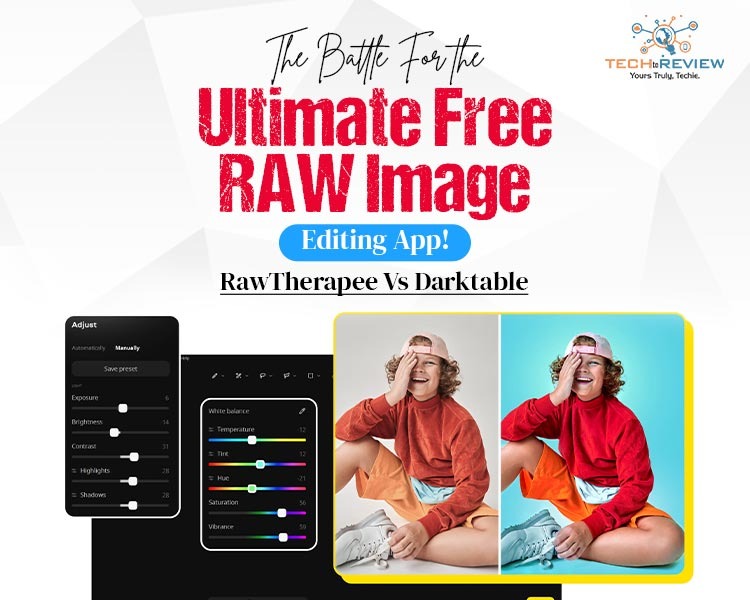
RAW images are the bread and butter of any photographer worth his salt. However, sometimes, editing those RAW images can be a frustrating, borderline maddening experience. Some apps, like Adobe, offer subscriptions that don’t make sense monetarily if you’re just editing photos. For this reason, several thousand photographers are swiftly shifting to free alternatives. This is where RawTherapee and Darktable come into play. Before we get into our RawTherapee Vs Darktable comparison, here is a number that might help put things in perspective: Darktable alone supports RAW files from more than 400 camera models, a library that rivals what most paid software offers. RawTherapee is not far behind, and it has built a loyal following among Fujifilm shooters for a reason we will get into later.
We are not discussing if free tools can compete with their paid counterparts; that ship has sailed. We know they can, with ease. The bigger question we want to answer is which of them is the best free image editor. That is what this Darktable vs RawTherapee breakdown is here to answer, without beating around the bush.
RawTherapee Vs Darktable At a Glance
Here is a brief comparison between RawTherapee and Darktable.
Now let’s unpack what each of these actually means for your day-to-day editing.
Colour Grading: Where the Darktable vs RawTherapee Debate Gets Personal
Colour grading is one of the most important aspects of RAW image editing, or any image editing for that matter, because colour is what people notice first. RawTherapee leans on tone curves, HSV adjustments and a colour toning module that feels intuitive if you’ve used Adobe Lightroom or Capture One before, which you must have if you are a photographer.
Darktable, on the other hand, ditches some of that intuitiveness and leans more towards being a little technical by offering colour zones and scene-referred workflow that give you finer control over your image’s colour. If you enjoy tweaking every channel independently, darktable rewards the effort. If you want good colour fast, RawTherapee usually gets you there sooner.
User Interface & Learning Curve
This is where the RawTherapee vs Darktable debate makes things clearer than ever before. Most people claim that the arrangement and grouping of the tools in RawTherapee is easier to get familiar with within a few sessions. Panels are labelled clearly, and the sliders behave the way they are supposed to.
Darktable’s interface is powerful but dense. Modules stack on top of each other, and understanding the processing pipeline order takes time, but it is precise. Like really very precise. Photographers who invest a weekend into learning it tend to stick with it for years. Those who want to open the software and start editing on day one often lean toward RawTherapee instead.
Size, Speed and System Requirements
If you don’t have the bleeding edge of technology at your disposal, you might wanna read this section thoroughly. The thing is, a RAW image in itself is quite big compared to JPEG or PNG. As a result, you need software that doesn’t make your processor walk that extra mile. If you have an old system, RawTherapee is better because it is noticeably lighter and processes images quickly, even on modest hardware.
Darktable is a completely different ball game. It is heavy, gives out way more professional results and has GPU acceleration, which, as the name suggests, uses the GPU of your system and makes your system noticeably slow. If you have a modern CPU with a decent, entry-level GPU, Darktable is the way to go. But for people with an older setup, RawTherapee is the way to go.
You Might Also Like: 7 Photo Editing Apps for Instagram for Co7 Photo Editing Apps for Instagram for Content Creators
RAW Processing and Camera Support
Both editors handle demosaicing well, but they have different strengths. RawTherapee's algorithms are particularly well regarded for Fujifilm's X-Trans sensor, a format that has historically been difficult for other software to render cleanly. If you shoot Fuji, this alone might settle the RawTherapee vs Darktable question for you.
Darktable, on the other hand, wins on sheer breadth of camera compatibility, supporting formats from well over 400 camera models. If you shoot with a mix of bodies or an older camera that other software has dropped support for, Darktable is more likely to have you covered.
Which One Should You Actually Pick?
Just as the case with most comparisons, there is no universal winner in the RawTherapee vs Darktable conversation, and honestly, that is a good thing. If you want something lighter, faster to learn, and excellent for Fuji RAW files, RawTherapee is the practical choice. If you want a deeper, more customizable pipeline, do not mind a learning curve, and your machine can handle it, Darktable is worth the time investment.
Plenty of photographers actually run both side by side, using RawTherapee for quick batch work and Darktable for images that need heavier grading. Try both on the same set of RAW files this weekend.
FAQs
1- Is RawTherapee as good as Lightroom?
A- Yes. In their ability to edit RAW images, both are equally good and give comparable results based on what people prefer.
2- Is RawTherapee Completely Free?
A- Yes. RawTherapee is a free RAW image editing tool that offers all the bells and whistles of a comparable paid app.
3- What do most professionals use to edit photos?
A- Most professionals either use Lightroom or Photoshop, both of which are from Adobe.
How to Download Netflix Series as MP4 on a Laptop

Are you planning a long flight or weekend trip without reliable internet? Downloading your favorite Netflix series in advance seems like the great solution.
From Cards to Screens: The Evolution of Digital Games

Card games and board games used to come with a fair bit of setup. You needed the cards, pieces or board in front of you, and in many cases someone else had to be there too.
RTX 5060 vs RTX 4060: Is the Newer GPU Worth Your Money?
RTX 5060 vs RTX 4060: Compare gaming performance, FPS, GDDR7 vs GDDR6, DLSS features, power consumption, and prices to choose the right GPU in 2026.
How I Reclaimed Crucial SSD Space Without Deleting Essential Data Using Advanced SystemCare 20

I did not want to drag folders to the Recycle Bin and hope for the best. I wanted to free up room without losing documents, photos or settings. That is how I ended up testing Advanced SystemCare 20, a free Windows cleaner from IObit.
Samsung TV Not Connecting to WiFi? Get the Easy Fixes Here

Samsung TV not connecting to WiFi? Learn why it happens, try easy step-by-step fixes, and know what to do if nothing works. Fix & get back to streaming fast.
Rangefinder Digital Cameras: Benefits and Limitations

Discover what a rangefinder in digital camera is, how its focusing works, its advantages and limitations, and why photographers love it for street photography.