
How To Create Your Own Whatsapp Stickers Apps On Android

Previously, limited numbers of stickers were provided by Whatsapp. It has not allowed the third-party applications to create apps with stickers’ packs which can be integrated within the apps. Developers are able to design their own stickers for Whatsapp which are effectively packaged them into an Android or iOS app. It creates an avenue for users to share their creations with the world. Ultimately, it creates disturbances on the apps of the Google Play store and App Store. Users must have to download the required application to integrate stickers into their Whatsapp. Basically, you can stick to the general standards of stickers on Whatsapp by creating legally acceptable and authorized stickers. Whatsapp has given a sample code that allows users to create a stickers app. In this stickers app, it uses minimal or no level of coding knowledge.
Stickers and App Requirements:

It is necessary for people to follow certain requirements and certain restrictions before creating a sticker app. Particular sticker app ensures that the creations are compatible and well-structured to integrate them. There are some guidelines, which you must have to follow for creating the stickers, are given below:
• You must have to download a background eraser or also a PNG image creator which does the same for your images.
• A sticker app can able to hold between one to ten sticker packs anywhere; each of them must be explicitly added to Whatsapp by the user.
• Each of these sticker packs has three to thirty numbers of stickers.
• A sticker must have an exact 512*512 pixel canvas within the art must be contained. There must be a gap of 16-pixel between the edge of the sticker art as well as the border of the canvas.
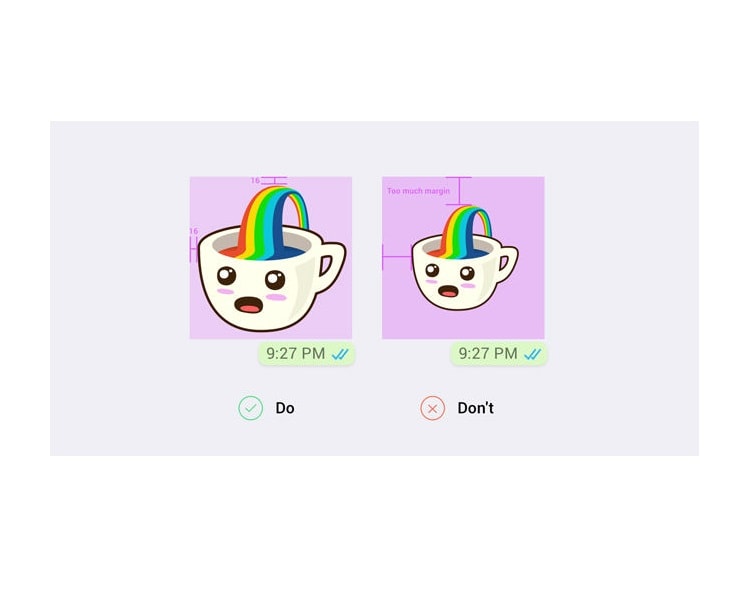
• Those stickers must be capable of providing in a wide variety of backgrounds like black, white, colored and also patterned. All stickers must be present in the WebP format. Some stickers like animated WebP are not yet supported in Whatsapp.
• An individual sticker must be less than 100KB to ensure that users can see your stickers immediately upon opening the chat.
• An identifier is necessary for each sticker pack. This image must be 96*96 pixels with a maximum size of 50KB.
The company suggests to reduce the size of the PNG file to facilitate loading times and lesser data consumption. Its in-house stickers are about 15KB each. It seems to be the optimal size. There are various methods that have proved successful in reducing the sizes of these images are explained below;
• You have to convert your PNG file to a WebP file. Then reduce the size while making this transformation. You must attempt to set the quality of the image to below 100% until you can get the lowest size of the image without any prominent declaration.
• You may utilize a PNG optimizer or Tool to achieve this end. You can also use PNGYU, a simple PNG compression tool. And this PNGYU is only for MAC users or Windows by downloading it here.
Convert To WebP File:
.jpeg)
You have to convert your PNG images to WebP for creating stickers for Whatsapp. This format is doing a great job in retaining image quality alongside reducing the file size, preferred state for stickers. There are a few methods to convert your PNGs to WebP.
• You have to enable the Android Studio to make the conversation from PNG to WebP seamlessly. Now create a new project on Android to open your PNG sticker art. Then right click on the image and click convert to WebP. You will now uncheck the box which says ‘Skip images with transparency or the alpha channel’.

• Install a plug-in for Photoshop which allows conversations to WebP. Now download it for MAC or Windows.
• Additionally, you can also utilize cwebp, which is introduced as a command line conversion tool.
Read more Article: Whatsapp Call Recorder
About author

Rangefinder Digital Cameras: Benefits and Limitations

Discover what a rangefinder in digital camera is, how its focusing works, its advantages and limitations, and why photographers love it for street photography.
Why Phone Storage Gets Full Even If You Barely Install Anything

Discover why your phone storage fills up without installing apps. Learn how cached files, photos, hidden downloads, and system data consume space.
Top 5 Entry-Level DSLR Camera Picks to Buy in 2026

Looking for a great beginner camera? Discover the top 5 entry-level DSLR cameras to buy in 2026, featuring the best budget, travel, and video choices.
Best LED Black Friday TV Deals: Your TV Shopping Guide

Discover the best LED Black Friday TV deals for 2026: when sales start, how much you can save on LED, QLED, and OLED TVs, plus tips to spot fake discounts.
Portable Bluetooth Speaker: Best Picks for Your Travel Bag

Looking for a portable Bluetooth speaker for travel? Check out 5 easy-to-carry options with different sound, battery, and durability features.
Budget Gaming PC: The Smart Gamer’s Guide to Saving Money

Looking for a budget gaming PC? Learn how to choose the right GPU, CPU, RAM, storage, PSU, and cooling without overspending.