
All You Need To Know About Autonomous ErgoChair 2
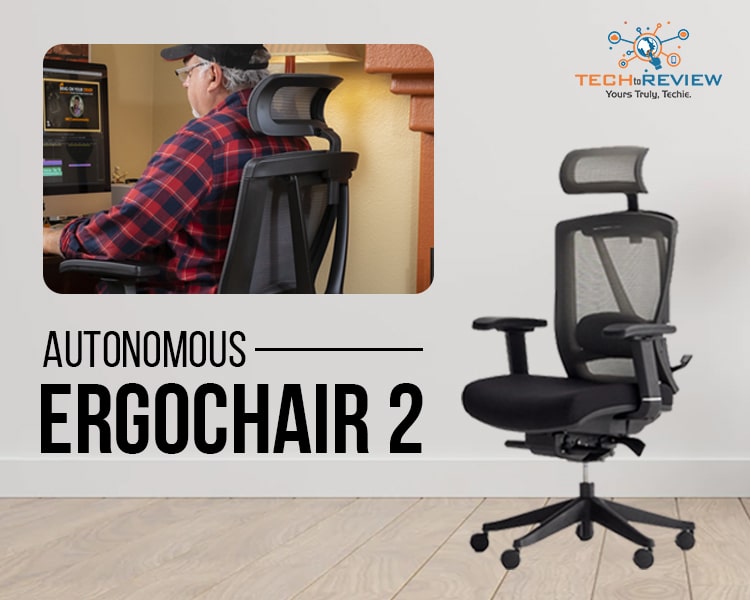
An Autonomous ErgoChair 2 is a uniquely designed and developed chair intended to offer sheer comfort at your workplace. Your performance at the workplace relies on your well-being which refers to good physical and mental health. From what you eat to how you sit, everything affects your well-being, no matter positively or negatively. We all spend almost the whole day on an office chair. Therefore, it is worth having one that gives you optimum comfort and support to work well. This need has contributed significantly to the invention of ergonomic chairs like Autonomous ErgoChair 2.
The chair is created to support users in whatever posture or position they are comfortable with. Finding a chair with suitable ergonomics totally depends on luck. But offering flexibility to set the right ergonomic suitable for you at this price point is something exceptional. The portable flexibility of Autonomous ErgoChair 2 allows a user to get backrest, armrest, and lumbar support and stay in a posture that optimises comfort.
Autonomous ErgoChair 2: Specifications
Autonomous ErgoChair 2 is a lax chair designed to achieve the correct ergonomics while sitting for an extended time. A user has to move different parts of the chair to get the right posture. ErgoChair 2 comes with the flexibility to adjust the tilt, depth and height. Moreover, the four-dimensional armrests support the front, back, height, angle adjustment and side-to-side. The backrest feature enables angle adjustment and can repose. Moreover, there is a flexible headrest and support for the lumbar spine. They both can be adjusted vertically.
As different people require different things, it is not evident that a chair can work right for everyone. Therefore, Autonomous ErgoChair 2 comes with a trial period of 30 days. During this duration, if you find that the chair is not suiting you or can not be adjusted to your suitable posture, you can return it and get a full refund with a free return shipping facility. Autonomous also offers a 2-year warranty, which is fair but not quite as long as some premium office chairs, like the Steelcase Leap V2's limited lifetime warranty.
Autonomous ErgoChair 2- Set-up Process
Assembling an Autonomous ErgoChair is simple and clear, particularly considering the chair's multiple adjustment points. The chair comes with an assembling tool kit, as well as bolts and washers. It will take no more than 30 minutes from unpacking to assembling. The directions are quite simple, and there are no difficult parts to assemble. The only component that may be difficult for solo assembling is joining the backrest to the seat since they are both huge and heavy parts that require some skill to keep in place while positioning the bolt holes. The next difficult component of having the chair completely adjusted is the number of adjustments it permits. There are several knobs, levels, locks, and sliders to adjust, so it takes some time.
Autonomous ErgoChair 2: Design
The Autonomous ErgoChair 2 gives the sense that it was designed for ergonomics. This is mostly due to the mechanical elements of the backrest. Aside from that, the chair is available in enough combinations to function as a basic office chair in all black, grey, white, and their combination or as a statement piece with more bright red, green, or blue seat padding.
Considering its ergonomic qualities, the chair is, however, attractive and does not go into H.R. Giger's design area, as several ergonomic chairs do. However, despite its pricing range, the Autonomous ErgoChair 2 has superior materials. Mesh is a nice addition to the backrest, but there aren't many metal or fake leather components.
Final Words
It's even more amazing that Autonomous ErgoChair 2 demonstrates how effectively its adjustments can suit a wide variety of customers. The chair should easily suit anyone in the 5-foot range, and it could even fit someone as tall as 6-feet-5-inches, thanks to an extensive height range for the seat, armrests, and headrest.
Read More Article: MediaTek Dimensity 9000 processor
About author

Portable Bluetooth Speaker: Best Picks for Your Travel Bag

Looking for a portable Bluetooth speaker for travel? Check out 5 easy-to-carry options with different sound, battery, and durability features.
Budget Gaming PC: The Smart Gamer’s Guide to Saving Money

Looking for a budget gaming PC? Learn how to choose the right GPU, CPU, RAM, storage, PSU, and cooling without overspending.
Why Is My Cell Phone Getting Hot? Learn the Quick Fixes

Wondering why is my cell phone getting hot? Discover the hidden triggers behind your device overheating and learn quick, safe tricks to cool it down fast.
How to Make Your Laptop Run Faster: Easy Ways to Speed Up

Is your laptop slow or freezing? Learn easy ways of How to make your laptop run faster, from clearing files and updating software to upgrading RAM and SSD.
Why Responsible IT Asset Disposition Matters in the Age of Constant Upgrades

Discover why responsible IT asset disposition matters in an upgrade-driven world, helping businesses protect data, reduce waste, and recover asset value.
3:2 vs 16:9: Which Aspect Ratio Should You Choose

Wondering about 3:2 vs 16:9 aspect ratios? Learn the key differences, best use cases, and limitations to pick the right one for your shots.