
Asus VivoBook S15 Review: The Best Budget Laptop In The Market
Techtoreview Verdict at the Top: |
||
|
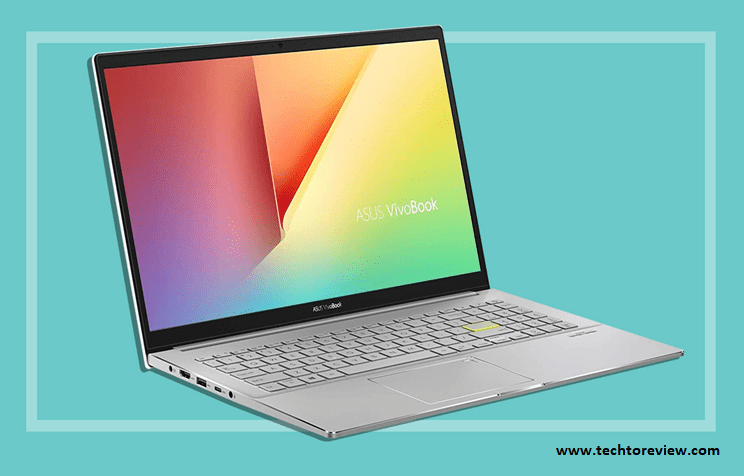
If you’ve been waiting for a stylish, big-screen, feature-packed yet affordable laptop, the 15.6, FHD Asus VivoBook s15 (S533) FA would be a good option. This is not just the best budget laptop to buy in 2020, but also an excellent laptop in overall specifications & features. It has proved that not all big-screen laptops are boring in day-to-day work. Besides doing well in your everyday needs, it’s an amazing business laptop too. Available in black, green, red, and white color variants, it comes with enough power to serve students and people working from home. Also, it will suit your interior with its amazing design and appealing panel exterior. Here are the pros and cons based on our Asus VivoBook s15 Review.
|
Asus VivoBook S15 Review: Laptop Design for the Next Generation
Whether you shop online or visit a laptop store physically, you’ll see that today’s market has more laptops than ever before, varying from various sizes, specifications, features, and prices. But most shoppers, land a store physically with a straightforward mindset of purchasing a 15-inches notebook that could meet all their needs and replace their entry-level desktop. Replace in the sense of performing as per the desktop. Well, such laptops are available in the market that can take over the desktop market in the near future.
They basically start searching like this, it must be pocket-friendly, powerful battery, and has the ports of their needs. We searched and found the Asus VivoBook S15 is literally focusing on these aspects. It is a budget 15-inches laptop that comes in a sleep, stylish design with long battery life and amazing performance for the prices. So, what convinced us to take a review on this machine is the cheap prices without any downside that comes once in a Bluemoon. It has left no stone unturned to earn our editor’s pick for the best budget laptop to buy in 2020.
ASUS VivoBook S15 Review: Gauge Through the Performance
Talk about the performance because that’s the primary concern of most shoppers when buying a laptop. So, we found the Asus VivoBook S15 quite good when it comes to performances. We tested the $1,299 model that comes with a 10th Gen 1.6GHz Quad-core Intel Core i5-10210U processor that obtained a certificate for delivering the best speed even when playing GTA V. Also, with the 6MB cache and Turbo Boost technology, it comes with a decent storage capacity - 8GB RAM and a powerful 512GB SSD. You can also choose another model with high specs of 1.8GHz Quad-core i7-10520U processor that would be slightly expensive but worth the price. Due to its powerful performance, it was one of the best laptops to buy in 2020.
Techtoreview Opinion: It comes with a 10th-gen Intel Processor, amazing SSD storage, powerful performance, and the all-new Wi-Fi 6 Networking. Therefore the performance is worth the cost and you can invest in this blindly.
ASUS VivoBook S15 Review: Keyword and Touchpad
Whether or not you are a writer or spend the most time with the keyboard of your laptop, you must check for the keyword straight and touchpad. The 15.6-inches ASUS VivoBook S15 comes with more space than other compact models, even if you have big hands. You can even do your work in the dark with its backlit keyboard. The keys are neither too big nor small and come with a 16mm width.
The keys feel so soft and are not very loudly like the Lenovo Ideapad 145 that sounds so much. Additionally, the function keys work properly to control brightness, sound, and all. But you will need to be aware of the power button that comes in the top right and can be easily pressed accidentally.
Also, the trackpad comes with an ideal size of 105mm X 73mm with a smooth texture. It will let you enjoy all Windows 10 gestures including the two-finger slider.
Techtoreview Opinion: The keyboard is really amazing as we typed this in the daylight and the keys were clearly visible. Thanks to the yellow light and LED in the Caps Lock and power button.
ASUS VivoBook S15 Review: Design and Build Quality
Why do we have a separate section for this? Because it’s really amazing when it comes to design and build quality. We can put our money on the fact that you won’t find a solid laptop than the Asus VivoBook S15 at the same price. Above all, it’s slim (16.1mm) and lightweight (1.8kg) only and the screen size is 15.6-inches. The build quality is really good and it won’t get a crack in normal handling.
With the small size, it can fit comfortably in your lap and you can continue with your work even in the metro or cab. Besides the flat back, you get an extra layer of security with its rubber pads when using them on the desk.
The screen has a low screen to body ratio to make the most of the screen. But, don’t push the screen from the back because it’s quite sensitive and can be marked when pressure comes from the back. Also, the keyword tray is solid and the keys don’t jump immediately when you type. That’s what makes a nasty sound.
Also, we have noticed that some laptops create a loud sound under load, but the Asus VivoBook S15 doesn’t do that because it comes with a solid cooling fan. We watched the complete Stranger Things and the fans were not audible.
Techtoreview Opinion: During the review, we found the VivoBook S15 a good product to use at home or office, even under the full load.
Asus VivoBook S15 Review: Screen and Audio
As this is an under-budget laptop, despite its compact 15.6-inches small screen, the screen is just 1920PixelsX1080Pixels (Full HD or 1080P), powered by an Intel HD graphic card. However, it comes with very good horizontal and vertical angles. The matte screen finish ensures a non-reflective screen.
The colors were pretty good when we tested though there was a slight yellow tint. Asus confirms that the thin “NanoEdge” screen surrounds comes with a 86% screen-to-body ratio. It has got the Harman Kardon-certificate for the outstanding sound system, which delivers ultra-clear balanced sound.
Techtoreview Opinion: The sound is pretty good but the basic webcam is not as effective as others. Though, you would no longer use it.
Asus VivoBook S15 Review: Battery Life & Connectivity
This is the most important thing to determine whether or not a laptop is good. The battery of the model we tested lasted for just 6-hours in heavy usage, so you can expect to spend a whole day on normal usage. Also, if you run out of the battery, you can supercharge it up to 80% in just 1.5 hours.
Talking about connectivity, the VivoBook comes with a good set of ports for all your needs. Here’s what you get on the name of ports.
Left-side ports:
● 1 x USB 3.2 (Type-A)
● 1 x USB 3.2 (Type-C)
● Full-sized HDMI
● Power and audio
Right-side ports:
● 2 x USB 2.0 ports (Type-A)
● MicroSD card slot
With the aforementioned specs and features, we found the Asus VivoBook S15 an outstanding powerful budget laptop. It’s perfect for all usage, be it working from home, gaming, or study. You will get an amazing user experience. So, grab it right now.
About author

Rangefinder Digital Cameras: Benefits and Limitations

Discover what a rangefinder in digital camera is, how its focusing works, its advantages and limitations, and why photographers love it for street photography.
Why Phone Storage Gets Full Even If You Barely Install Anything

Discover why your phone storage fills up without installing apps. Learn how cached files, photos, hidden downloads, and system data consume space.
Top 5 Entry-Level DSLR Camera Picks to Buy in 2026

Looking for a great beginner camera? Discover the top 5 entry-level DSLR cameras to buy in 2026, featuring the best budget, travel, and video choices.
Best LED Black Friday TV Deals: Your TV Shopping Guide

Discover the best LED Black Friday TV deals for 2026: when sales start, how much you can save on LED, QLED, and OLED TVs, plus tips to spot fake discounts.
Portable Bluetooth Speaker: Best Picks for Your Travel Bag

Looking for a portable Bluetooth speaker for travel? Check out 5 easy-to-carry options with different sound, battery, and durability features.
Budget Gaming PC: The Smart Gamer’s Guide to Saving Money

Looking for a budget gaming PC? Learn how to choose the right GPU, CPU, RAM, storage, PSU, and cooling without overspending.